Smart Home
Smart Camera Setup & Installation
Setup Issues? Expert Help Available
We provide step-by-step assistance for setting up wireless security cameras, including device installation, WiFi connection, app configuration, and troubleshooting common setup errors.
Whether your camera is not connecting, facing syncing issues, or showing setup errors, our experts can guide you through a quick and hassle-free setup process.
Get your home security system up and running smoothly with reliable support designed to fix issues fast and ensure long-term performance.
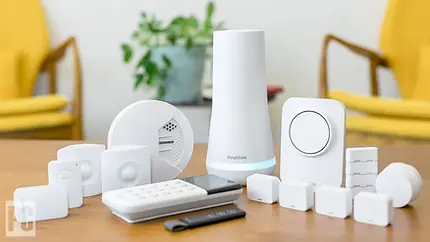
Wifi Camera Setup Guidance for Everyday Smart Home
Smart home systems are designed to make daily life more convenient, efficient, and secure—but real-world usage often comes with unexpected challenges. Devices may disconnect, automations may fail, or performance may vary depending on network conditions and setup quality.
This guide focuses on practical, real-life scenarios that users face after installation. Instead of complex technical theory, the emphasis is on clear, actionable steps that help you maintain consistent performance, improve reliability, and get the most out of your smart home ecosystem. All recommendations follow general best practices and are intended to support safe, compliant, and effective usage.

✔️ Setup & Configuration Checklist
-
Ensure all devices are installed according to manufacturer guidelines
-
Use a stable and secure Wi-Fi network (prefer dual-band or mesh setup if needed)
-
Keep device firmware and mobile apps updated to the latest versions
-
Assign clear names to devices for easy control and automation
-
Group devices logically (e.g., Living Room, Bedroom, Office)
✔️ Connectivity & Performance Checklist
-
Place your router in a central, obstruction-free location
-
Avoid signal interference from thick walls or heavy electronics
-
Check internet speed and stability regularly
-
Reconnect or reset devices if they frequently go offline
-
Use compatible ecosystems to reduce integration issues
✔️ Automation & Routine Checklist
-
Start with simple automations before creating complex routines
-
Test each automation step-by-step to ensure accuracy
-
Set realistic triggers (time, motion, location)
-
Avoid overlapping or conflicting automations
-
Review and optimize routines periodically
✔️ Security & Privacy Checklist
-
Use strong, unique passwords for all accounts and devices
-
Enable two-factor authentication where available
-
Regularly review device permissions and access controls
-
Keep software updated to protect against vulnerabilities
-
Avoid connecting unknown or unsupported third-party devices
✔️ Troubleshooting Checklist
-
Restart the device and router as a first step
-
Check app settings and permissions
-
Reinstall or update the controlling app if issues persist
-
Verify device compatibility before adding new products
-
Refer to official support resources when needed
A Practical Resource for Smart Home Users
Smart home technology delivers the most value when it works reliably in everyday situations. This resource is built to help you manage your devices with clarity and confidence—covering setup, performance, automation, and ongoing maintenance in a simple, practical way.
Instead of complex technical explanations, the focus is on real-world usage. You’ll find straightforward guidance to help you avoid common issues, improve system stability, and keep everything running smoothly over time.
✔️ What This Resource Covers
-
Clear setup guidance for smart devices and apps
-
Practical tips to improve connectivity and performance
-
Easy methods to create and manage automations
-
Basic security practices to protect your system
-
Simple troubleshooting steps for common problems
✔️ Why It’s Useful
-
Helps reduce device errors and connection issues
-
Improves daily usability and system response
-
Saves time with clear, actionable instructions
-
Supports a more secure and stable smart home setup
-
Makes smart technology easier to manage for all users
✔️ Quick Checklist for Users
-
Keep devices and apps updated
-
Ensure a stable internet connection
-
Organize devices by room or function
-
Test automations regularly
-
Address issues early to avoid bigger problems
FAQs – Smart Home Guidance
Below are commonly asked questions with clear, practical answers to help you manage your smart home system efficiently and reliably.
What is a smart home system?
A smart home system connects devices like lights, cameras, thermostats, and appliances so they can be controlled remotely or automated through a mobile app or voice commands.
Why are my smart devices not connecting?
This usually happens due to weak Wi-Fi signals, incorrect setup steps, or compatibility issues. Ensure your internet connection is stable, devices are within range, and setup instructions are followed correctly.
How can I improve device connectivity?
Place your router centrally, reduce physical obstructions, and use a strong Wi-Fi network. Keeping firmware and apps updated also helps maintain stable connections.
Why do my automations sometimes fail?
Automation failures can occur due to incorrect triggers, network delays, or conflicting routines. Review your automation settings and test each condition step-by-step.
How do I make my smart home more secure?
Use strong passwords, enable two-factor authentication, update devices regularly, and avoid connecting unknown third-party integrations.
What should I do if a device goes offline?
Restart the device and router, check Wi-Fi connectivity, and reconnect the device through the app if needed.
Are all smart devices compatible with each other?
Not always. It’s important to check compatibility before purchasing or adding new devices to your system to avoid integration issues.
How often should I update my devices?
You should install updates whenever they are available, as they improve performance, fix bugs, and enhance security.
Can I control my smart home remotely?
Yes, most smart home systems allow remote access through mobile apps, provided your devices are connected to the internet.
What is the first step in troubleshooting?
Start with basic steps like restarting the device, checking internet connectivity, and reviewing app settings before moving to advanced solutions.